Dots & Arcs
A hybrid analog–digital watch face with two switchable clock styles, six live complications, and colors that automatically shift with the sky. Every detail — from the dot shape to the day/night palette — is yours to tune.
Pick how you want to read the time
Switch between two completely different looks any time, right from the customizer — no need to pick one forever.
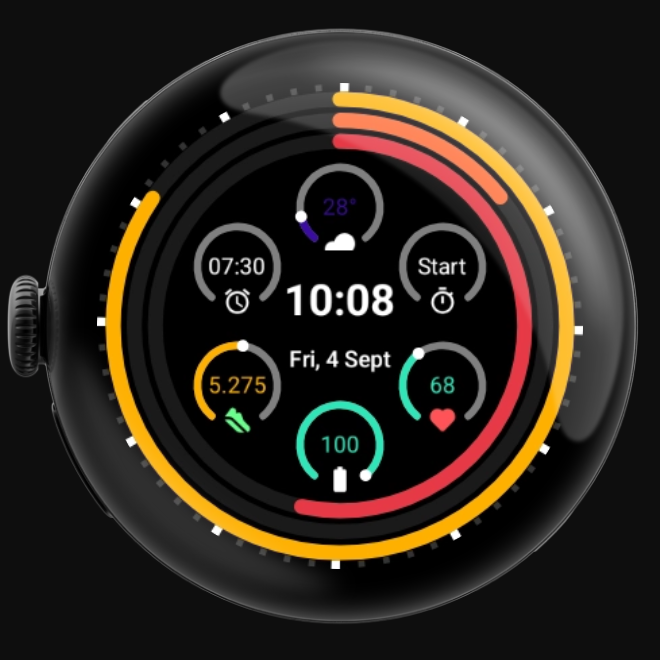
Concentric Arcs
Three nested arcs sweep clockwise around the dial — the outer ring fills over the hour, the middle ring over the minute, and the inner ring over the second. Choose a flush ring layout or add a small gap between each arc, and optionally break the rings into segmented tick marks for a more mechanical feel.
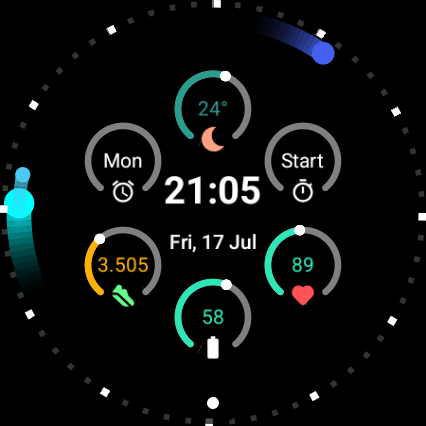
Orbital Dots
Three dots orbit the bezel, each sitting exactly where an hour, minute, and second hand would point — a minimal, marker-free dial that leaves the center completely open for complications. Pick the dot shape that fits your taste: Round, Droplet, or Comet, a motion-trail dot that visibly "moves" clockwise as time passes.
Seven complications, always in view
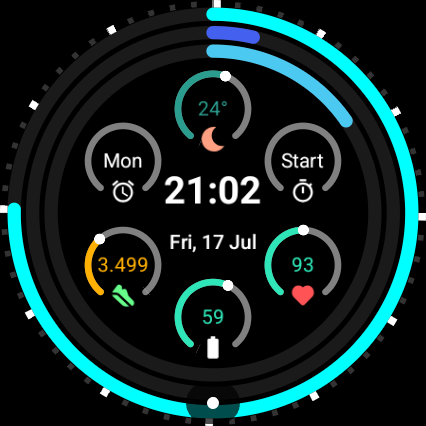
Six fixed slots are spaced evenly around the dial, each with its own themed progress ring and icon. A larger seventh slot sits in the center — it defaults to the day and date, but you can reassign it to any complication you like. A separate always-on clock is layered underneath it, so the real time is never hidden, no matter what you put in the center slot.
Weather
12 o'clock. Live temperature with a color gradient from cold to hot.
Timer
2 o'clock. Quick access to a running or stopped timer.
Heart Rate
4 o'clock. Live BPM, defaults to the watch's built-in sensor.
Battery
6 o'clock. Ring and text shift color as charge runs low.
Steps
8 o'clock. A progress ring that fills toward your daily step goal.
Alarm
10 o'clock. Your next alarm at a glance.
Battery, Steps, and Heart Rate also support a colorblind-friendly status palette as an alternate to the default red/amber/green warning colors — one tap to switch, in Settings.
Colors that follow the sky
By default, Dots & Arcs automatically switches between a day palette and a night palette using real sunrise/sunset data — no manual toggle needed. Prefer full control instead? Switch to Custom mode and hand-pick the exact hour, minute, and second color yourself.
8 built-in palettes
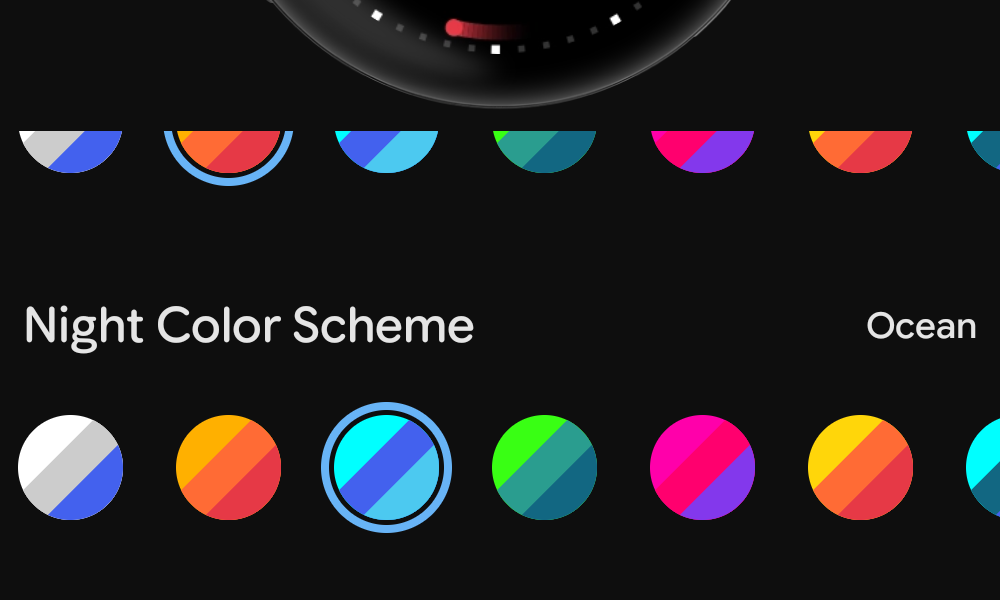
Classic, Sunset, Ocean, Forest, Neon, Fire, Ice, and Berry — pick any one for day and any one for night, independently.
Fully custom colors
Choose from 15 hand and accent colors for hour, minute, and second — set once for both day and night, or set a separate palette for each.
Colorblind-friendly palettes
Two built-in schemes drawn from the Okabe–Ito color-vision-deficiency-safe palette, avoiding hard-to-distinguish red/green pairings.
Automatic, not manual
Day/night switching is driven by real weather-provider sunrise/sunset data, with a sensible time-of-day fallback when that data isn't available.
All 10 color schemes
Each swatch set is hour / minute / second, in that order. Mix and match any scheme for day with any scheme for night.
Classic
Sunset
Ocean
Forest
Neon
Fire
Ice
Berry
Colorblind Blue
Colorblind Contrast
Curated flavors
Not sure where to start? The companion app's Flavors carousel bundles a clock style, dot shape, and color scheme into a single tap.
Sunset Arcs (default)
Segmented arcs in warm amber-to-red, cooling to Ocean blue at night.
Neon Dots
Droplet dots in electric magenta and purple, shifting to Berry at night.
Classic Arcs
Clean white and silver arcs, no gap, no segments — the plain analog look.
Ice Dots
Round dots in cool cyan and teal, staying cool into an Ocean night.
Fire Arcs
Segmented arcs in blazing yellow-to-red, cooling to Berry at night.
Colorblind Arcs
Segmented arcs using the Okabe–Ito colorblind-safe palette.
Colorblind Dots
Round dots using the same colorblind-safe palette.
More ways to make it yours
12 / 24-hour arc (Arcs)
Sets whether the hour arc completes a full lap every 12 hours or every 24 — a subtler, slower sweep across the whole day.
Ring gap (Arcs)
Toggle a small gap between the hour, minute, and second arcs, or keep them flush.
Segmented arcs (Arcs)
Break each arc into individual tick segments instead of a smooth sweep.
Dot shape (Dots)
Round, Droplet, or Comet — a motion-trail dot that reads as clockwise movement.
See it in motion
Each clip loops a few seconds of the setting changing live on the watch face.
12 / 24-hour arc
The hour arc's fill length changing sweep period.
Ring gap & segmented arcs
How the arcs change from flush to gapped to segmented.
Round, Droplet, Comet
The three orbiting dot shapes, back to back.
In always-on / ambient display mode, the second indicator hides automatically and the face switches to a simplified low-power layout — no setting to manage, it just happens.
How to customize it
- Open the customizer. On the watch, long-press the current watch face and tap the pencil icon. Or, on your phone, open the Wear OS companion app → Watch Faces → Dots & Arcs → the gear/edit icon.
- Swipe through settings. Clock style, ring gap, segmented arcs, dot shape, 24-hour format, colorblind status colors, and color mode each get their own page.
- Pick your colors. Choose "Presets" for automatic day/night switching, or "Custom" to hand-pick hour/minute/second colors yourself.
- Assign complications. Tap directly on any data slot on the watch face — Weather, Timer, Heart Rate, Battery, Steps, Alarm, or the center slot — and choose a data source from the list.
- Or just tap a Flavor. In the companion app, swipe through the curated Flavors row and tap one for an instant, fully-configured look.
Two editions, one design
Dots & Arcs
The full experience, including live color changes.
- Automatic day/night color switching
- Full custom color mode
- Colorblind-friendly status colors
Dots & Arcs Classic
The same two clock styles, dot shapes, and seven complications, simplified for older watch hardware that can't do live color changes.
- One fixed color scheme (no automatic day/night switching)
- Same complication layout and customization
Frequently asked
Will this drain my battery?
The face switches to a simplified, low-power layout automatically in always-on/ambient mode — the same behavior any well-behaved Wear OS watch face uses.
Can I use any app for the Weather, Timer, and Alarm complications?
Yes — those three slots have no default provider, since Wear OS has no single built-in data source for them. Assign any installed app that supports that complication type.
What's the difference between the two editions?
Both look and behave the same day to day. The Classic edition (for Pixel Watch 1/2) uses one fixed color scheme instead of automatic day/night switching, since that older hardware doesn't support live color changes.
Where do I change settings after installing?
Long-press the watch face and tap the pencil icon, or open the Wear OS companion app on your phone and tap the edit/gear icon next to Dots & Arcs.